Prompt Library

Nano Banana Image Prompt

By AI Trend Prompt Hub Editorial Team · Updated 2026-06-04 · 20 copy-ready prompts · 7 FAQs

Use these nano banana image prompts to create cute miniature banana characters, stickers, icons, toy-style product shots, and playful mascot visuals. Each prompt gives the banana a clear personality, scale, peel texture, expression, props, background, lighting, and output style so the image feels like a finished concept instead of a random fruit picture.

20 cute nano banana promptsFor stickers, mascots, icons, and toy conceptsMacro style, product shots, and social images

What is Nano Banana Image Prompt?

A nano banana image prompt is a playful AI image instruction built around tiny banana characters, miniature scenes, stickers, icons, and cute mascot concepts. The prompt should define the banana character first, then add scale, expression, peel texture, props, background, lighting, and output format. Strong nano banana prompts often work because the subject is simple, recognizable, and easy to turn into a sticker, toy, mascot, or social post. For better results, ask for one clear character, one scene, and one output style such as 3D sticker, macro product photo, toy packaging, app icon, or cute astronaut scene. This page is for people who want copy-paste nano banana prompts and visual examples, not a live image generator.

Prompt Library

Copy a prompt, replace the placeholders, and run quick variations.

20 prompts

Prompt 1

Create a tiny nano banana character standing on a clean white surface. Give it a cheerful face, realistic peel texture, small arms and legs, soft studio lighting, macro photography, shallow depth of field, and a cute collectible toy feeling.

Prompt 2

Design a nano banana astronaut floating inside a miniature space capsule. Use a tiny helmet, silver suit details, banana peel texture, glowing control panels, stars outside the window, cinematic macro lighting, and a playful expression.

Prompt 3

Generate a sticker-style nano banana mascot with a happy face, rounded body, bold outline, soft shadow, simple pose, clean white background, and a cute social sticker look suitable for chat apps.

Prompt 4

Create a nano banana barista inside a tiny cafe scene. Add a miniature espresso cup, warm wood counter, small apron, steam, cozy morning light, realistic macro scale, and a friendly character expression.

Prompt 5

Create a packaged nano banana toy in a clear blister pack. Include a colorful backing card, tiny accessories, readable product title space, glossy plastic reflections, and front-facing product photography.

Prompt 6

Design a nano banana superhero on a small rooftop at sunset. Add a tiny cape, confident pose, city bokeh background, dramatic rim light, realistic peel texture, and a fun collectible character style.

Prompt 7

Generate a nano banana icon for a mobile app. Use a simple rounded banana character, friendly eyes, high contrast, flat 3D style, clean background, and strong silhouette that remains readable at small size.

Prompt 8

Create a nano banana chef holding a tiny pancake in a miniature kitchen. Use flour dust, warm lighting, detailed peel texture, shallow depth of field, and a charming food mascot mood.

Prompt 9

Make a surreal nano banana island in a teacup. Add tiny palm leaves, sand grains, blue water, a smiling banana character, macro photography, soft shadows, and a dreamy product-shot composition.

Prompt 10

Create a nano banana robot with tiny chrome limbs, glowing eyes, banana peel body, small circuit details, clean studio background, soft reflections, and a cute futuristic mascot style.

Prompt 11

Design a nano banana office worker sitting at a tiny laptop. Add miniature desk props, coffee cup, neutral background, natural window light, realistic scale, and a humorous productivity theme.

Prompt 12

Generate a nano banana birthday card image. Show a tiny banana character wearing a party hat, confetti, small cake, pastel background, soft 3D style, and room for a short greeting text.

Prompt 13

Create a nano banana sneaker product concept. Place the banana character beside a tiny shoe box, add streetwear stickers, polished product lighting, sharp details, and a clean social commerce composition.

Prompt 14

Create a nano banana detective in a miniature noir scene. Add a small trench coat, magnifying glass, desk lamp, shadowy background, peel texture, and cinematic macro photography.

Prompt 15

Design a nano banana garden scene with the character watering tiny flowers. Use bright natural light, dew drops, soft green background, realistic macro scale, and a wholesome sticker-like mood.

Prompt 16

Create a nano banana gamer mascot holding a tiny controller. Add RGB desk lighting, small headset, energetic pose, clean background, and a playful creator-brand avatar style.

Prompt 17

Generate a luxury nano banana collectible statue on a black display base. Use gold accents, premium product lighting, polished reflections, centered composition, and a limited-edition toy photography style.

Prompt 18

Create a nano banana travel poster scene. Show the tiny character with a suitcase in front of a miniature landmark, pastel colors, soft daylight, clean composition, and a charming postcard feel.

Prompt 19

Design a nano banana plush toy concept with fuzzy fabric texture, embroidered face, rounded shape, small tag, white studio background, and e-commerce product photography.

Prompt 20

Create a before-and-after concept image: left side a normal banana slice, right side the same banana as a tiny cute nano banana character. Use a clean split-screen layout, macro lighting, and clear transformation.
Prompt Builder

Build a usable prompt faster

Fill in the core details, copy the result, then refine one variable at a time inside your image model.

Generated prompt

Create a Nano Banana Image Prompt image of a real person. Style: realistic studio photo. Format: 1:1 square. Include natural lighting, clear focal point, realistic texture. Keep the composition clean, avoid distorted hands or unreadable text, and make the result ready for a social media post.

Prompt Quality Checklist

Use this checklist before you rerun a prompt. It keeps the output focused and makes it easier to improve one variable at a time.

One clear subject
Specific setting or background
Lighting and camera direction
Output format or aspect ratio
What should stay consistent
What to avoid or edit later

Best Use Cases

Cute sticker packs and chat app reactions.
Mascot concepts for apps, shops, and creator brands.
Miniature toy packaging and collectible product shots.
Social posts built around playful fruit characters.
App icon explorations with a simple readable silhouette.
Macro photography scenes with tiny props and soft light.

How to Use

  1. 1Pick a prompt based on the output you need: sticker, mascot, macro photo, icon, or surreal scene.
  2. 2Replace placeholders with a short phrase, brand niche, object, or mood.
  3. 3Keep the banana character central and avoid overloading the scene with too many competing ideas.
  4. 4For sticker-style results, ask for a clean white or transparent-looking background.
  5. 5For more realism, add macro photography, shallow depth of field, realistic peel texture, and soft natural light.

Examples

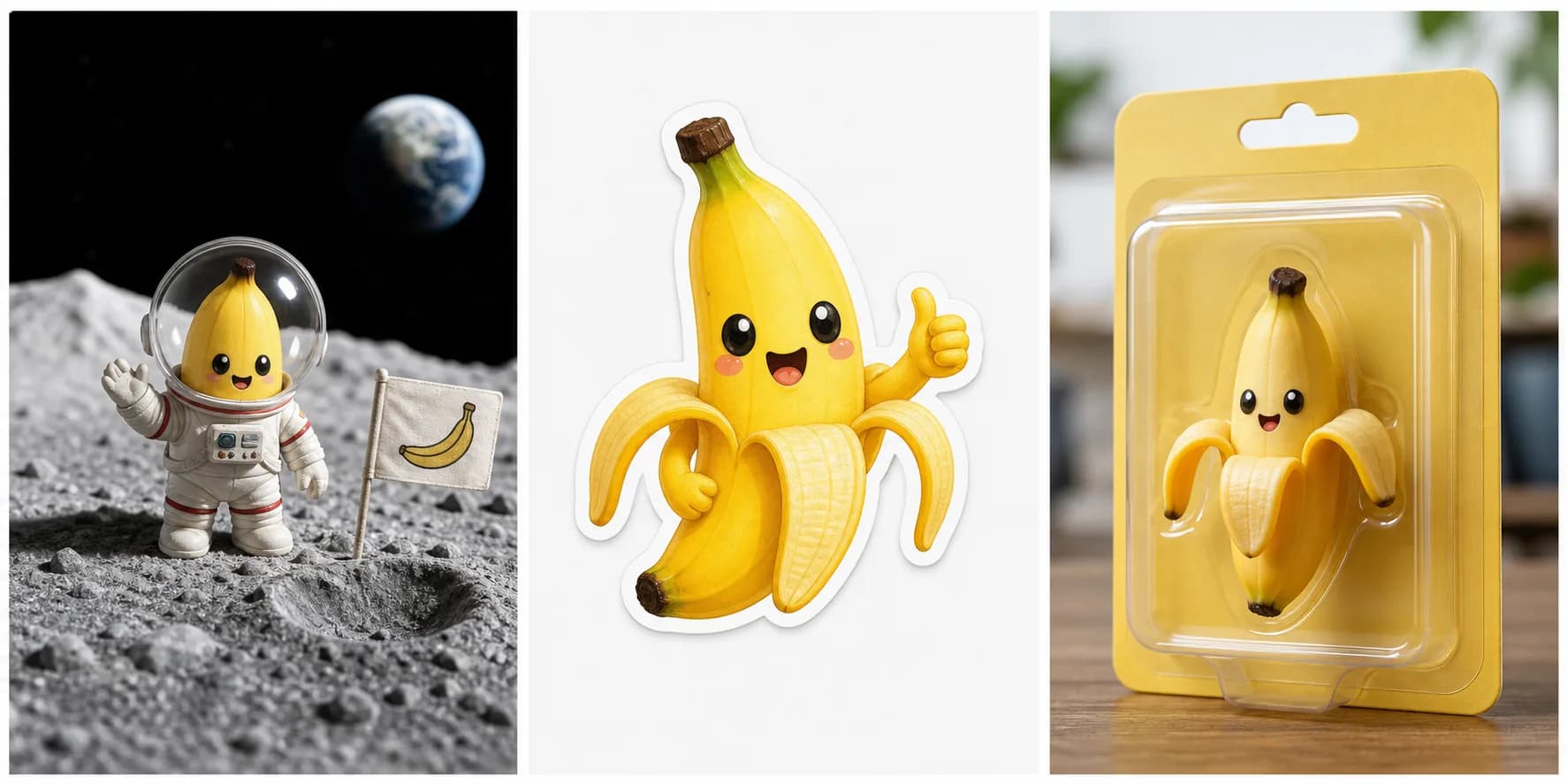
Real Nano Banana image prompt examples example for Nano Banana Image Prompt

Real Nano Banana image prompt examples

AI-generated example image

Shows three useful directions for nano banana prompts: character scene, sticker mascot, and toy/package concept.

Prompt used: Create a 3-panel nano banana showcase: tiny banana astronaut on the moon, cute banana sticker mascot, and toy-style banana package. Use playful expressions, peel texture, macro lighting, and no brand text.

Best Settings

  • Use macro photography or clean 3D sticker style depending on the result you want.
  • Keep one nano banana character as the main subject so the model does not split attention across props.
  • Specify peel texture, scale, expression, lighting, and background for more consistent outputs.
  • For stickers and icons, request a clean white background, bold silhouette, and simple readable shape.
  • For product-style images, add softbox lighting, centered composition, and realistic shadow detail.

Common Mistakes

  • Adding too many tiny props, which makes the character hard to read.
  • Forgetting to specify scale, so the result looks like a normal banana instead of a nano character.
  • Mixing sticker, photo, icon, and toy styles in one prompt instead of choosing one output format.
  • Asking for readable text inside the generated image when it is better to add text later.
  • Using dark cluttered backgrounds that hide the banana shape and facial expression.

FAQ

What is a nano banana image prompt?+

It is a prompt that asks an AI image model to create a tiny banana character or miniature banana-themed scene.

What makes nano banana prompts go viral?+

They are easy to understand, visually cute, and flexible enough for memes, stickers, mascots, and social posts.

Can I use these prompts for brand mascots?+

Yes. Replace the niche or object placeholders with your brand context, then refine colors, expression, and setting.

How do I get a cleaner sticker result?+

Ask for a simple outline, centered character, clean white background, soft shadow, and minimal extra objects.

Are nano banana prompts only for realistic images?+

No. They work for 3D renders, stickers, icons, toy packaging, macro photography, and surreal miniature scenes.

What is the best nano banana prompt style?+

The best nano banana prompt style is usually simple and specific: one cute banana character, one clear pose, one background, and one output format such as sticker, toy package, icon, or macro photo.

Can I use nano banana prompts for stickers and mascots?+

Yes. Nano banana prompts work well for stickers, mascot concepts, app icons, toy packaging ideas, social posts, and cute character experiments.

Get daily Nano Banana Image Prompt ideas

Get more Nano Banana Image Prompt prompts every day

Open the prompt feed for daily viral AI image ideas, Chinese notes, and ready-to-use prompt updates.