Prompt Library

AI Action Figure Prompt

By AI Trend Prompt Hub Editorial Team · Updated 2026-06-05 · 20 copy-ready prompts · 6 FAQs

Use these AI action figure prompts to turn a person, pet, mascot, creator persona, or fictional character into a collectible toy packaging image. The best results describe the figure, package type, pose, accessory layout, label style, camera angle, and lighting. Copy one prompt, replace the placeholders, then tune packaging colors and accessory details instead of rewriting everything from scratch.

20 toy packaging prompts to copyBlister packs, boxed figures, and starter packsClear accessory and product-photo details

What is AI Action Figure Prompt?

An AI action figure prompt is a copy-ready instruction for turning a person, pet, mascot, or fictional character into a collectible toy-style image. A strong prompt usually names the subject, package type, figure pose, accessories, label style, lighting, and camera angle. The goal is not just to make a character look like a toy. The goal is to make the whole image feel like a real retail product photo, with believable plastic, cardboard, shadows, and accessory layout. For best results, start with one clear subject, choose a packaging style such as blister pack or collector box, then add three specific accessories that explain the character. Keep text labels short because image models often struggle with small typography. This format is useful when the searcher wants a ready prompt, not a broad explanation, because each detail can be copied, replaced, and tested immediately.

Prompt Library

Copy a prompt, replace the placeholders, and run quick variations.

20 prompts

Prompt 1

Create a realistic collectible action figure of [subject] inside a clear blister pack. Use a matte cardboard backing, bold product title, three accessories ([accessory 1], [accessory 2], [accessory 3]), front-facing studio product photography, sharp plastic reflections, and a clean retail shelf look.

Prompt 2

Turn [subject] into a premium 1:12 scale action figure named [figure name]. Include molded tray packaging, removable accessories, a hero pose, detailed outfit textures, softbox lighting, and realistic shadows on a white e-commerce background.

Prompt 3

Design a retro 1990s action figure package for [subject]. Use bright comic-book backing art, a plastic window, collectible badge, chunky toy-store typography, saturated colors, and a nostalgic product photo composition.

Prompt 4

Create a luxury limited-edition action figure of [subject] in a black collector box with gold foil accents, velvet tray insert, numbered label, high-end product lighting, realistic plastic and fabric textures, and a centered front view.

Prompt 5

Generate a cute mini action figure of [pet or mascot] with an oversized head, rounded sculpt, clear blister packaging, tiny accessories, playful sticker labels, and soft studio shadows.

Prompt 6

Create a professional career action figure for [profession]. Show [subject] wearing [uniform or outfit], holding [tool], with accessories that represent daily work, clean packaging layout, realistic molded plastic tray, and crisp product photography.

Prompt 7

Design a futuristic hero action figure of [subject] in transparent box packaging with metallic backing card, neon accent lines, removable helmet, gear pieces, and cinematic rim lighting.

Prompt 8

Create a creator persona action figure for [creator name]. Package title: [title]. Tagline: [tagline]. Accessories: [list]. Make it look like a real collectible sold online, with clear hierarchy and realistic reflections.

Prompt 9

Generate a desk toy action figure of [subject] on a small display base. Include a simplified sculpt, three miniature props, clean background, soft shadows, and premium collectible photography.

Prompt 10

Create an action figure unboxing-style product image for [subject]. Show the box, figure, accessories, and instruction card arranged neatly on a tabletop, realistic packaging materials, natural daylight, and high detail.

Prompt 11

Turn [subject] into a villain-style action figure with dark collector packaging, dramatic red accent lighting, sculpted armor details, weapon accessory, and a moody product campaign look.

Prompt 12

Create a sports action figure of [subject] in [team colors], wearing [outfit], posed mid-action inside a blister pack, with trophy and gear accessories, realistic plastic tray, and energetic backing art.

Prompt 13

Design a fashion action figure of [subject] wearing [outfit style], with wardrobe accessories, shoe box mini prop, glossy package window, editorial product lighting, and boutique retail design.

Prompt 14

Create a minimalist action figure package for [subject] using a white backing card, clean black typography, symmetrical accessory layout, soft shadows, and high-resolution product detail.

Prompt 15

Generate a toy catalog image showing three variants of [subject] as action figures: classic, cyberpunk, and cute mascot. Keep the same identity, consistent packaging angle, and distinct accessory sets.

Prompt 16

Create a macro close-up of [subject] action figure inside packaging, focusing on face sculpt, accessory tray, molded plastic reflections, and realistic cardboard texture.

Prompt 17

Design a family-friendly action figure of [subject] with cheerful colors, simple readable title, safe rounded accessories, bright studio lighting, and polished toy-store packaging.

Prompt 18

Create a fantasy warrior action figure of [subject] with cape, armor, sword, shield, parchment-style backing card, dramatic product lighting, and realistic collector box details.

Prompt 19

Generate a before-and-after image: left side original [subject], right side the same identity as a boxed action figure, matching outfit colors, clear transformation, and clean split-screen composition.

Prompt 20

Create a social media square post of [subject] as a collectible action figure. Use bold packaging, strong visual hook, readable title space, realistic toy materials, and a shareable product-photo finish.
Prompt Builder

Build a usable prompt faster

Fill in the core details, copy the result, then refine one variable at a time inside your image model.

Generated prompt

Create a AI Action Figure Prompt image of a real person. Style: realistic studio photo. Format: 1:1 square. Include natural lighting, clear focal point, realistic texture. Keep the composition clean, avoid distorted hands or unreadable text, and make the result ready for a social media post.

Prompt Quality Checklist

Use this checklist before you rerun a prompt. It keeps the output focused and makes it easier to improve one variable at a time.

One clear subject
Specific setting or background
Lighting and camera direction
Output format or aspect ratio
What should stay consistent
What to avoid or edit later

Best Use Cases

Creator starter pack images for social posts.
Pet or mascot collectible toy packaging concepts.
Product-style mockups for a character, founder, or profession.
Before-and-after transformations from photo to boxed figure.
Pinterest and Reddit share images for toy packaging trends.
Accessory layout experiments before final design editing.

How to Use

  1. 1Choose the prompt closest to your target style: retro toy, luxury collectible, cute mascot, or realistic product photo.
  2. 2Replace every bracketed placeholder with concrete details. Specific accessories and outfit details usually improve results.
  3. 3Run one clean version first, then make small changes to packaging color, lighting, pose, or camera angle.
  4. 4If the model adds unreadable text, simplify the label instructions and add the final text later in a design tool.
  5. 5Save the strongest versions and reuse the same structure for new subjects.

Examples

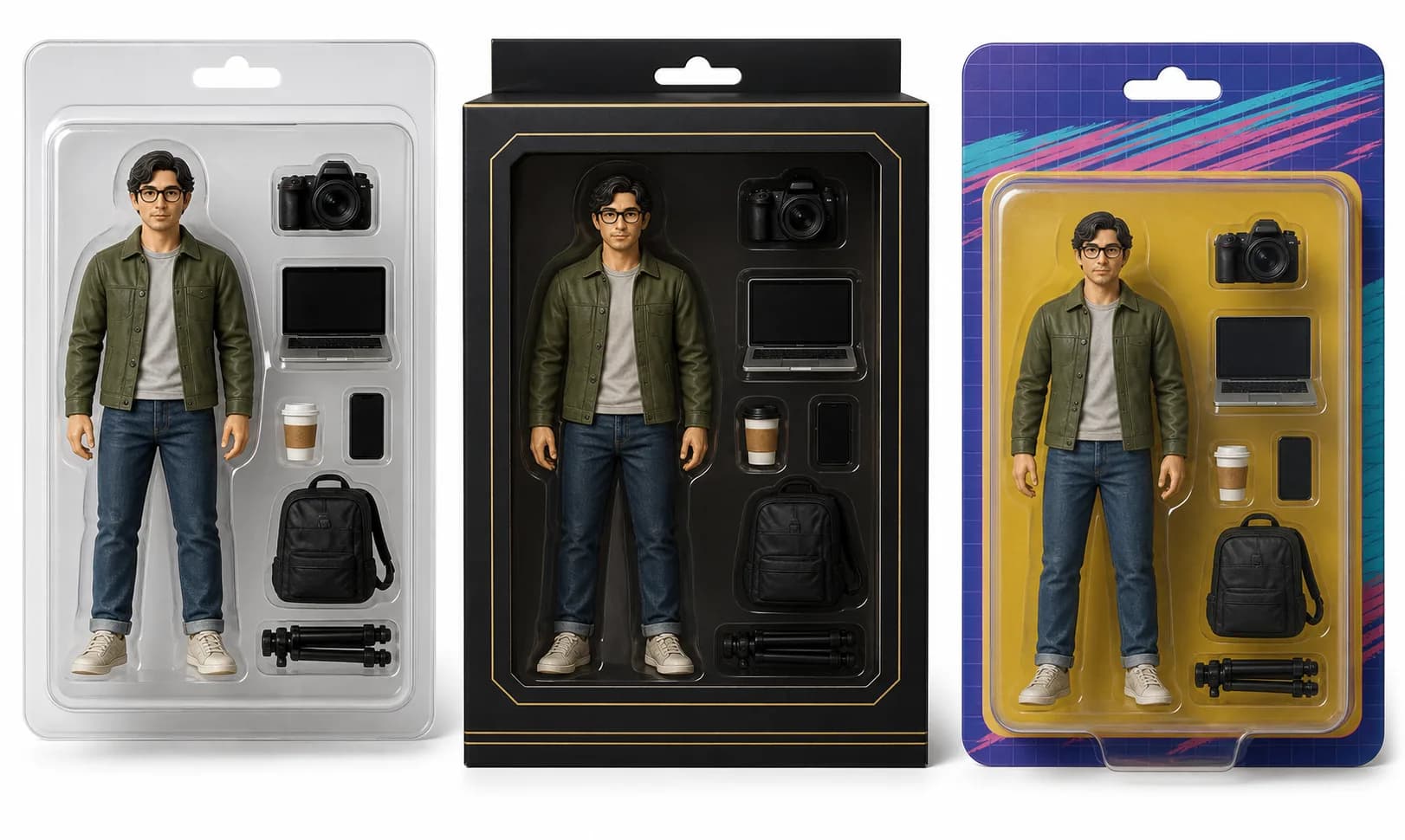
Real AI action figure package examples example for AI Action Figure Prompt

Real AI action figure package examples

AI-generated example image

Shows the packaging language that makes action figure prompts stronger: blister pack, collector box, backing card, molded tray, and accessories.

Prompt used: Create a 3-panel action figure package showcase: creator blister pack, premium black collector box, and retro toy-store backing card. Include accessories and product photography lighting.

Best Settings

  • Use square or 4:5 aspect ratio for packaging images; use 9:16 only for social story posts.
  • Ask for front-facing product photography when you need readable packaging and a stable layout.
  • Keep package text short; add exact typography later in a design tool if the model misspells words.
  • Use three accessories at most. Too many props often makes the package messy.
  • For realism, include plastic reflections, molded tray, cardboard texture, and soft studio shadows.

Common Mistakes

  • Using a famous character or protected brand name; use original subjects and styles instead.
  • Asking for too much label text; AI image models often create unreadable typography.
  • Changing the whole prompt after one bad output instead of refining pose, package color, or accessory layout.
  • Forgetting camera angle; packaging prompts work better with front view or slight 3/4 product view.
  • Mixing too many styles, such as retro, luxury, cute, and cyberpunk in one image.

FAQ

What is an AI action figure prompt?+

It is a text prompt that asks an AI image model to turn a subject into a toy-style action figure, usually with packaging, accessories, and product photography details.

Can I use these prompts with Midjourney, ChatGPT image tools, or other generators?+

Yes. The prompts are written in plain English and can be adapted for most modern AI image tools. You may need to adjust aspect ratio or style parameters for your platform.

Why do AI models struggle with packaging text?+

Image models often render small text imperfectly. Keep text short, use simple labels, and consider adding final typography manually after generating the image.

What details should I replace first?+

Start with the subject, outfit, accessories, packaging style, and color palette. These details have the biggest effect on the final image.

Are these prompts for commercial use?+

The prompts are original templates, but you should check the usage rules of your AI image platform and avoid using protected characters or brands without permission.

How do I make the result look more realistic?+

Add product photography terms such as studio lighting, realistic plastic texture, molded tray, soft shadows, sharp focus, and front-facing composition.

Get daily AI Action Figure Prompt ideas

Get the AI Action Figure Prompt prompt pack

Open the prompt feed for daily AI photo ideas, Chinese notes, and ready-to-use prompt updates.