Prompt Library

AI LinkedIn Headshot Prompt

By AI Trend Prompt Hub Editorial Team · Updated 2026-07-02 · 20 copy-ready prompts · 9 FAQs

Use these AI LinkedIn headshot prompts to create realistic professional profile photos without making the person look artificial. Each prompt focuses on identity preservation, natural expression, clean studio lighting, neutral backgrounds, business-appropriate clothing, and subtle retouching. They work well for LinkedIn profile photos, founder pages, resumes, speaker bios, recruiter outreach, and personal branding images.

20 professional LinkedIn profile photo promptsFounder, recruiter, resume, and speaker bio looksRealistic lighting with subtle retouching

What is AI LinkedIn Headshot Prompt?

An AI LinkedIn headshot prompt is a copy-ready instruction for creating a realistic professional profile photo from a source image or text description. The safest prompt preserves the person identity while improving lighting, background, crop, clothing, and overall polish. It should ask for natural expression, realistic skin texture, business-appropriate styling, and a clean head-and-shoulders composition. Good prompts avoid plastic skin, heavy retouching, fake smiles, and dramatic face changes. For LinkedIn, the best outputs usually use neutral gray, warm office, or soft studio backgrounds with clear eye contact. This page is built for searchers who want practical profile photo prompts they can copy, not a fake headshot generator.

Prompt Library

Copy a prompt, replace the placeholders, and run quick variations.

20 prompts

Prompt 1

Create a realistic professional LinkedIn headshot of [subject]. Keep the same face, age, skin tone, and natural features. Use soft studio lighting, neutral gray background, business casual outfit, relaxed confident expression, and sharp focus.

Prompt 2

Generate a professional profile photo for [subject] with a clean office background, natural smile, navy blazer, white shirt, soft daylight, realistic skin texture, and no heavy retouching.

Prompt 3

Create a founder-style headshot of [subject] for a startup profile. Use modern workspace background, warm natural light, confident expression, shallow depth of field, and authentic professional look.

Prompt 4

Transform [subject] photo into a recruiter-ready LinkedIn headshot. Keep identity unchanged, remove distracting background, add neutral studio backdrop, subtle suit jacket, and balanced facial lighting.

Prompt 5

Generate a corporate headshot of [subject] wearing [outfit]. Use clean composition from chest up, eye-level camera, soft shadows, realistic hair detail, and trustworthy expression.

Prompt 6

Create a professional speaker bio photo of [subject] with dark blazer, warm background blur, natural skin texture, crisp eyes, and polished but realistic lighting.

Prompt 7

Make a friendly LinkedIn profile image of [subject] with light beige background, simple shirt and blazer, soft smile, realistic face proportions, and clean crop.

Prompt 8

Create a remote-work professional headshot of [subject] in a bright home office, natural window light, clean background, business casual outfit, and approachable expression.

Prompt 9

Generate a premium executive headshot of [subject] with charcoal suit, subtle gradient background, controlled studio lighting, high detail, and natural expression.

Prompt 10

Create a creative professional headshot of [subject] for design or marketing roles. Use modern background, smart casual outfit, warm lighting, and a confident but approachable pose.

Prompt 11

Turn [subject] selfie into a polished LinkedIn portrait. Correct lighting, simplify background, keep identity and face structure unchanged, and avoid plastic skin.

Prompt 12

Create a profile photo for [industry] professional: [subject] wearing [outfit], neutral background, clear eye contact, soft studio light, and realistic skin detail.

Prompt 13

Generate a black-and-white professional headshot of [subject] with clean contrast, natural expression, simple background, sharp facial detail, and editorial crop.

Prompt 14

Create a square LinkedIn avatar of [subject] with head and shoulders visible, balanced margins, neutral background, professional outfit, and clear face recognition.

Prompt 15

Make a warm consultant-style headshot of [subject] with beige background, soft side lighting, subtle smile, realistic texture, and polished business look.

Prompt 16

Create a university alumni profile photo of [subject] wearing smart casual outfit, campus-style background blur, natural daylight, and professional crop.

Prompt 17

Generate a team page headshot of [subject] matching a consistent company style: neutral background, similar crop, soft light, clean outfit, and realistic face detail.

Prompt 18

Create a high-trust finance or legal headshot of [subject] with formal suit, plain background, confident eye contact, restrained retouching, and crisp lighting.

Prompt 19

Generate a tech founder headshot of [subject] with black t-shirt and blazer, modern office blur, clean lighting, natural smile, and sharp but realistic detail.

Prompt 20

Create a before-and-after profile photo: left casual selfie, right polished LinkedIn headshot. Preserve identity, improve lighting, outfit, background, and professional crop.
Prompt Builder

Build a usable prompt faster

Fill in the core details, copy the result, then refine one variable at a time inside your image model.

Generated prompt

Create a AI LinkedIn Headshot Prompt image of a real person. Style: realistic studio photo. Format: 1:1 square. Include natural lighting, clear focal point, realistic texture. Keep the composition clean, avoid distorted hands or unreadable text, and make the result ready for a social media post.

Prompt Quality Checklist

Use this checklist before you rerun a prompt. It keeps the output focused and makes it easier to improve one variable at a time.

One clear subject
Specific setting or background
Lighting and camera direction
Output format or aspect ratio
What should stay consistent
What to avoid or edit later

Best Use Cases

LinkedIn profile photos for job search and recruiter views.
Founder portraits for landing pages and pitch decks.
Resume, speaker bio, and personal brand headshots.
Remote worker profile images with clean office backgrounds.
Executive-style studio portraits without heavy retouching.
Consistent team profile photos from different source images.

How to Use

  1. 1Pick the prompt that best matches your visual goal.
  2. 2Replace bracketed placeholders with concrete subject, style, and setting details.
  3. 3Generate a first version, then refine one variable at a time.
  4. 4Keep text instructions short if your image model struggles with readable labels.
  5. 5Save the strongest output and reuse the same prompt structure for new subjects.

Examples

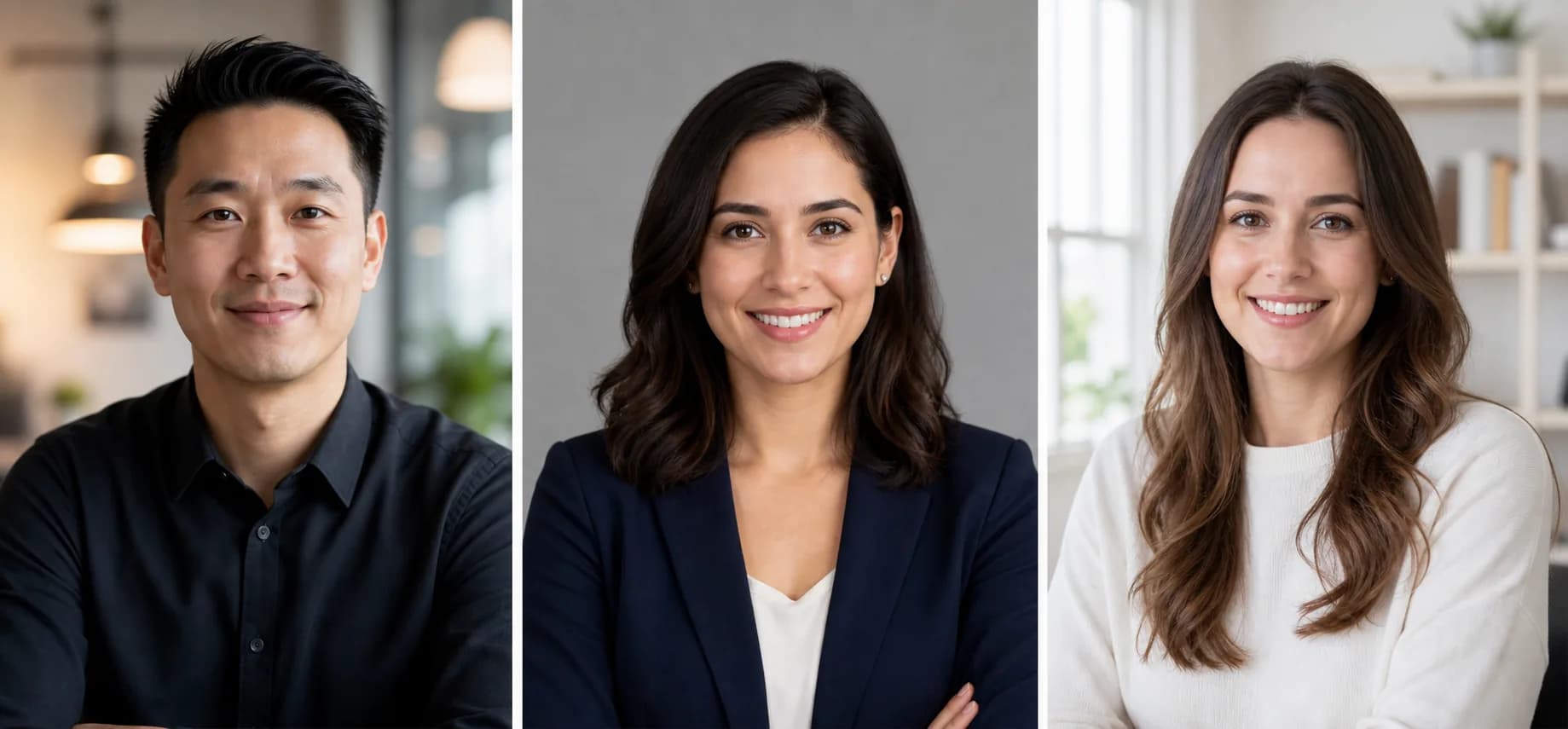
Real AI LinkedIn headshot examples example for AI LinkedIn Headshot Prompt

Real AI LinkedIn headshot examples

AI-generated example image

Shows three professional portrait directions users can copy: founder, recruiter-ready, and remote-work profile photo.

Prompt used: Create a 3-panel LinkedIn headshot showcase: founder profile photo, recruiter-ready studio portrait, and remote-work professional headshot. Use realistic skin texture and natural lighting.

Best Settings

  • Use the clearest front-facing source photo if editing from an existing image.
  • Ask for realistic skin texture, not beauty retouching.
  • Use chest-up or head-and-shoulders framing for LinkedIn.
  • Neutral gray, beige, or soft office backgrounds usually work best.
  • Avoid exaggerated smiles, heavy makeup, or dramatic cinematic lighting.

Common Mistakes

  • Letting the AI change identity, age, facial structure, or skin tone.
  • Choosing overly cinematic lighting that looks like a movie poster instead of a profile photo.
  • Using cluttered backgrounds that distract from the face.
  • Asking for too much retouching, which creates plastic skin.
  • Using a crop where the face is too small for LinkedIn avatars.

FAQ

What is an AI LinkedIn headshot prompt?+

It is a prompt for creating or editing a professional profile photo while preserving identity, realistic skin texture, natural expression, and a clean business-style crop.

How do I make a professional LinkedIn profile photo with AI?+

Use a clear source photo when possible, then ask the model to improve lighting, background, crop, and clothing without changing face shape, age, skin tone, or expression.

Do I need a dedicated AI headshot generator?+

No. These prompts can work in many AI image tools, especially tools that support reference images or photo editing. Dedicated headshot tools may be easier, but prompts give more control.

What should a LinkedIn profile photo prompt include?+

Include head-and-shoulders framing, eye-level camera, neutral background, realistic skin texture, natural smile, professional clothing, and identity preservation rules.

Are these LinkedIn headshot prompts free to copy?+

Yes, you can copy and adapt the prompt text. Check your AI image platform rules before using generated images commercially.

What makes an AI LinkedIn headshot look realistic?+

Preserve identity, use head-and-shoulders framing, neutral studio or office background, natural expression, realistic skin texture, and restrained retouching.

Can I use a selfie for a LinkedIn headshot prompt?+

Yes, but use a clear front-facing source photo and tell the model to improve lighting, crop, clothing, and background without changing face shape, age, or skin tone.

What makes a good AI LinkedIn headshot prompt?+

A good AI LinkedIn headshot prompt preserves identity first, then improves lighting, crop, background, clothing, and expression. It should ask for realistic skin texture and avoid heavy retouching.

Can I use these prompts for resumes and recruiter profiles?+

Yes. Use the recruiter-ready, resume, and founder portrait prompts when you need a clean professional photo for LinkedIn, resumes, speaker bios, or team pages.

Get daily AI LinkedIn Headshot Prompt ideas

Get the AI LinkedIn Headshot Prompt prompt pack

Open the prompt feed for daily AI photo ideas, Chinese notes, and ready-to-use prompt updates.