Prompt Library

AI Photo Editing Prompt Benchmark

Written and reviewed by · Updated 2026-08-28 · 12 copy-ready prompts · 7 FAQs

This AI photo editing prompt benchmark records what happened when we tested clothing-only editing, body-proportion constraints, photobooth layout instructions, and a background-only portrait edit. Each case keeps the source image, exact prompt, method, date, visible result, limitation, and next adjustment together. The goal is not to declare a universal winner. It is to show which instructions made the requested change easier to inspect and where the output still drifted.

4 source-to-result comparisonsExact prompts and test datesObserved failures includedNo unsupported cross-model ranking

What is AI Photo Editing Prompt Benchmark?

An AI photo editing prompt benchmark is a documented test that keeps the source image, requested change, exact prompt, locked details, result, and limitation visible together. In these four dated tests, explicit edit boundaries kept clothing changes focused, while named shoulder, waist, hip, and leg landmarks made an oversized outfit easier to inspect for body reshaping. Both a vertical four-cut strip and a square 2x2 print produced readable four-frame layouts, but the strip better matched a physical booth souvenir and the grid gave each face more room. A background-only portrait edit changed the setting yet tightened the crop, even though framing was locked. All cases used one declared OpenAI image-generation workflow and project-owned source files. They show how to inspect prompt behavior, not which model is best, whether another run will match, or whether identity was preserved biometrically. Use the result, limitation, and next fix together before adapting any prompt.

Prompt Library

Copy a prompt, replace the placeholders, and run quick variations.

12 prompts

Prompt 1

Replace only the clothing in the supplied source image with [new outfit]. Keep the exact same face, expression, hair, skin tone, age impression, body shape, pose, hands, camera angle, crop, background, lighting, and image quality unchanged. Render realistic fabric folds, seams, perspective, and matching shadows.

Prompt 2

Change only the current outfit to [oversized garment and trousers]. Preserve shoulder width, torso length, waist position, hip width, leg length, stance, and hand placement. The fabric may look oversized, but the body underneath must not become wider or taller.

Prompt 3

Edit only the background of this portrait. Replace it with [new setting]. Keep the face, hair edges, expression, clothing, shoulders, crop, lens look, subject lighting, and sharpness unchanged. Match the new background blur and brightness to the existing portrait.

Prompt 4

Create exactly four vertically stacked photobooth frames with the same subject in every panel. Use one simple pose per frame: [pose 1], [pose 2], [pose 3], [pose 4]. Add white borders, soft booth flash, a plain pastel background, and no readable microtext.

Prompt 5

Create one square 2x2 photobooth print with exactly four equal panels. Keep the same subject, outfit, hair, background, and crop across all panels. Use poses in reading order: [top left], [top right], [bottom left], [bottom right].

Prompt 6

Use the supplied person photo as the identity, pose, body, camera, and lighting reference. Use the second image only as a clothing reference. Transfer the garment design, fabric, and color without copying the second person's face, body, pose, or background.

Prompt 7

Before editing, list the target change and the locked details. Target change: [one edit]. Locked details: [face, body, pose, hands, background, lighting, crop]. Then perform only the target change and leave every locked detail unchanged.

Prompt 8

Make one conservative photo edit: [specific change]. Do not restyle the entire image. Do not improve the face, reshape the body, change the camera, replace the background, or add accessories unless explicitly requested.

Prompt 9

If the first edit changed the face, rerun from the original source. Change only [target area]. Preserve facial geometry, eye spacing, nose, mouth, jawline, skin tone, expression, hairstyle, and age impression. Remove all unrelated style instructions.

Prompt 10

If an outfit edit changed body proportions, rerun from the original. Preserve shoulder width, torso-to-leg ratio, waist height, hip width, arm length, leg length, stance, and camera perspective. Let the garment drape around the unchanged body.

Prompt 11

If a four-frame layout merges panels, simplify the request to exactly four panels, one person, one pose per panel, identical crop, plain background, thick white gutters, and no stickers or text until the layout is correct.

Prompt 12

After generating the edit, compare source and result in this order: face, hair, hands, shoulder width, waist position, leg length, pose, crop, background geometry, lighting direction, and only then the requested change. Rerun from the source if a locked detail moved.
Explore proven prompt libraries

Keep building with prompts that already match real search needs

Browse the strongest outfit, self-photo, photobooth, ChatGPT, and Gemini prompt pages without leaving this site.

Browse Popular Prompts

First-hand evidence

AI Photo Editing Prompt Benchmark

We retained project-owned source files, made one declared change per case, recorded the exact request, and inspected the result against the visible preservation rules. The outfit and headshot cases use separate source and edited result files. The photobooth case compares two independently generated layouts and is labeled as a composition comparison, not an identity test. All tests were run through OpenAI image generation and are observations from these files, not guarantees for other models or reruns.

Benchmark methodology

  • One primary change was requested per edit, while visible identity, pose, body, camera, lighting, or layout constraints were listed separately.
  • Source files and result files are stored as project-owned WebP assets so the comparison can be inspected again.
  • The exact prompt, date, observed result, limitation, and next adjustment are shown together for every case.
  • Visual observations are limited to what can be seen in the retained images; no hidden model settings or pixel-perfect identity score is implied.

What this does not prove

  • This benchmark does not rank different image models because equivalent outputs from multiple models were not available.
  • It does not prove that the same prompt will return an identical result on another run, account, model version, or safety configuration.
  • It does not establish legal clearance, biometric identity, or suitability for deceptive, official, medical, or other high-stakes uses.
  • The photobooth layout comparison does not test the same person's identity across both layouts.

Test 1 · OpenAI image generation · source-image edit · 2026-08-17

Does clothing-only wording reduce unrelated changes?

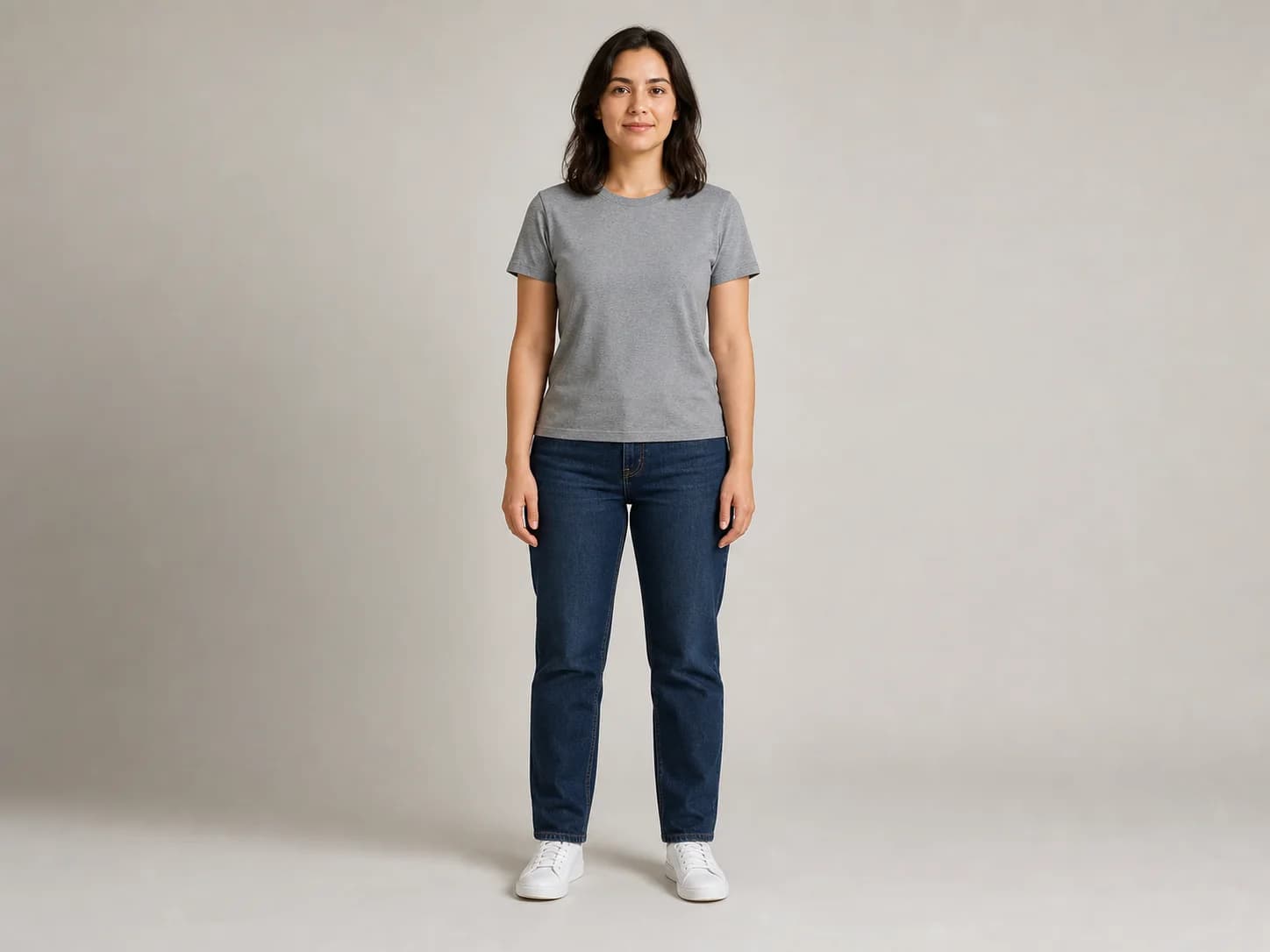
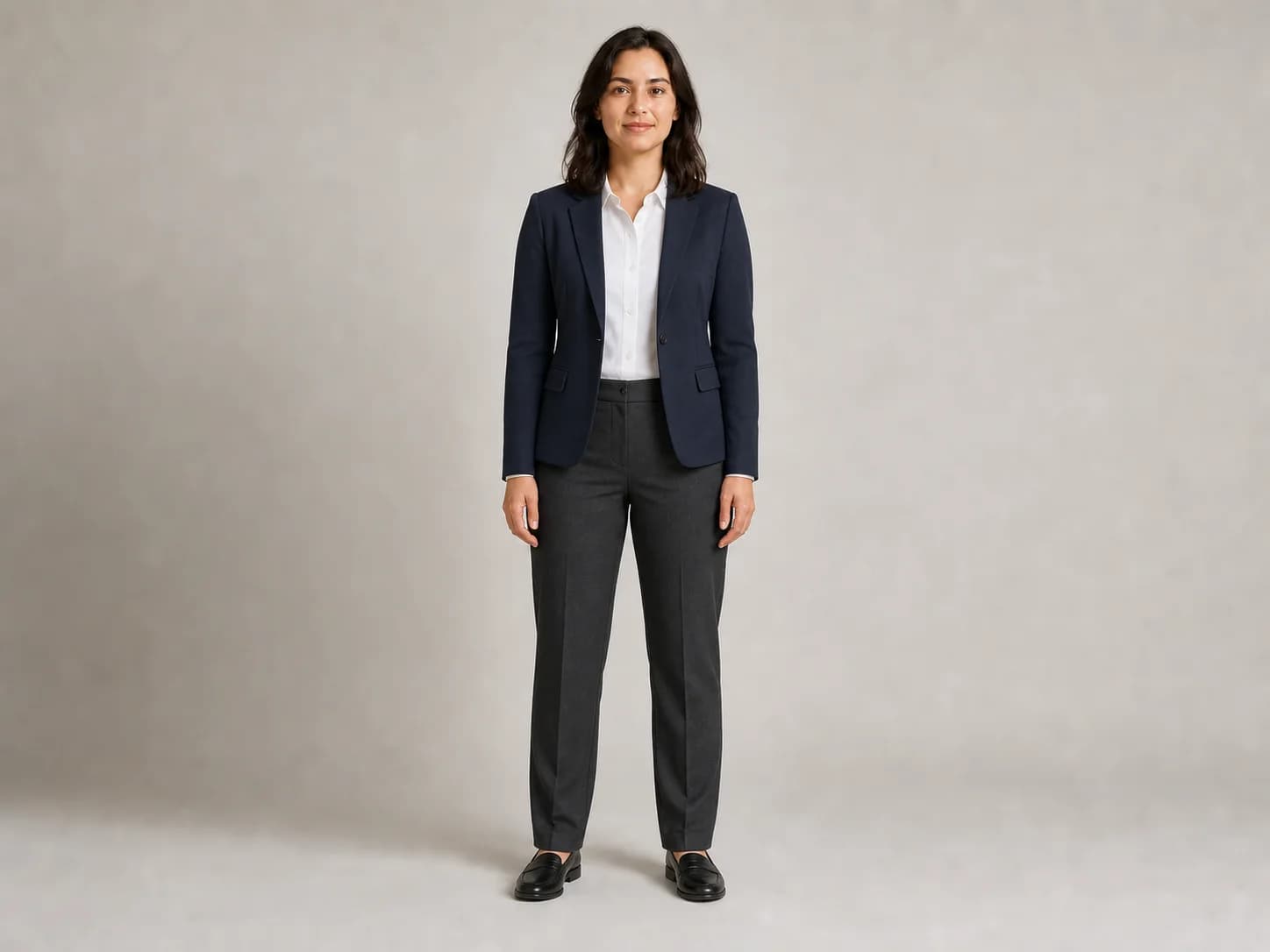
The source uses a plain T-shirt and jeans. The result requests a business outfit while explicitly locking the person, pose, camera, studio, and light.

Changed: clothing category
Source: gray T-shirt and jeans for Does clothing-only wording reduce unrelated changes? in the AI Photo Editing Prompt Benchmark
Source: gray T-shirt and jeans
Result: business outfit only for Does clothing-only wording reduce unrelated changes? in the AI Photo Editing Prompt Benchmark
Result: business outfit only

Exact prompt

Edit the supplied source image. Replace only the clothing with a polished business-casual outfit: tailored navy blazer, crisp white button-front shirt, straight charcoal trousers, and simple black low-profile shoes. Change only the clothing. Keep the exact same fictional woman's face, expression, hair, skin tone, age impression, body shape, shoulder width, waist, hips, leg length, stance, hand position, camera angle, crop, studio background, floor, lighting direction, shadows, and image quality unchanged. Render realistic lapels, cuffs, seams, fabric folds, trouser drape, perspective, and contact shadows.

Observed result
The requested blazer, shirt, trousers, and shoes changed while the face, hair, stance, hands, neutral studio, light direction, and framing stayed visibly close to the source.
Limitation
Visual similarity is strong but it is not a biometric or pixel-level identity test, and the garment replacement covers parts of the original torso outline.
Next fix
For stricter work, mask only the garment region, retain the original face layer, and compare facial landmarks, shoulders, wrists, hips, knees, and ankles before accepting the edit.
Held constant
fictional identity, pose, body proportions, hands, camera, studio, lighting

Test 2 · OpenAI image generation · source-image edit · 2026-08-17

Can an oversized outfit avoid reshaping the body?

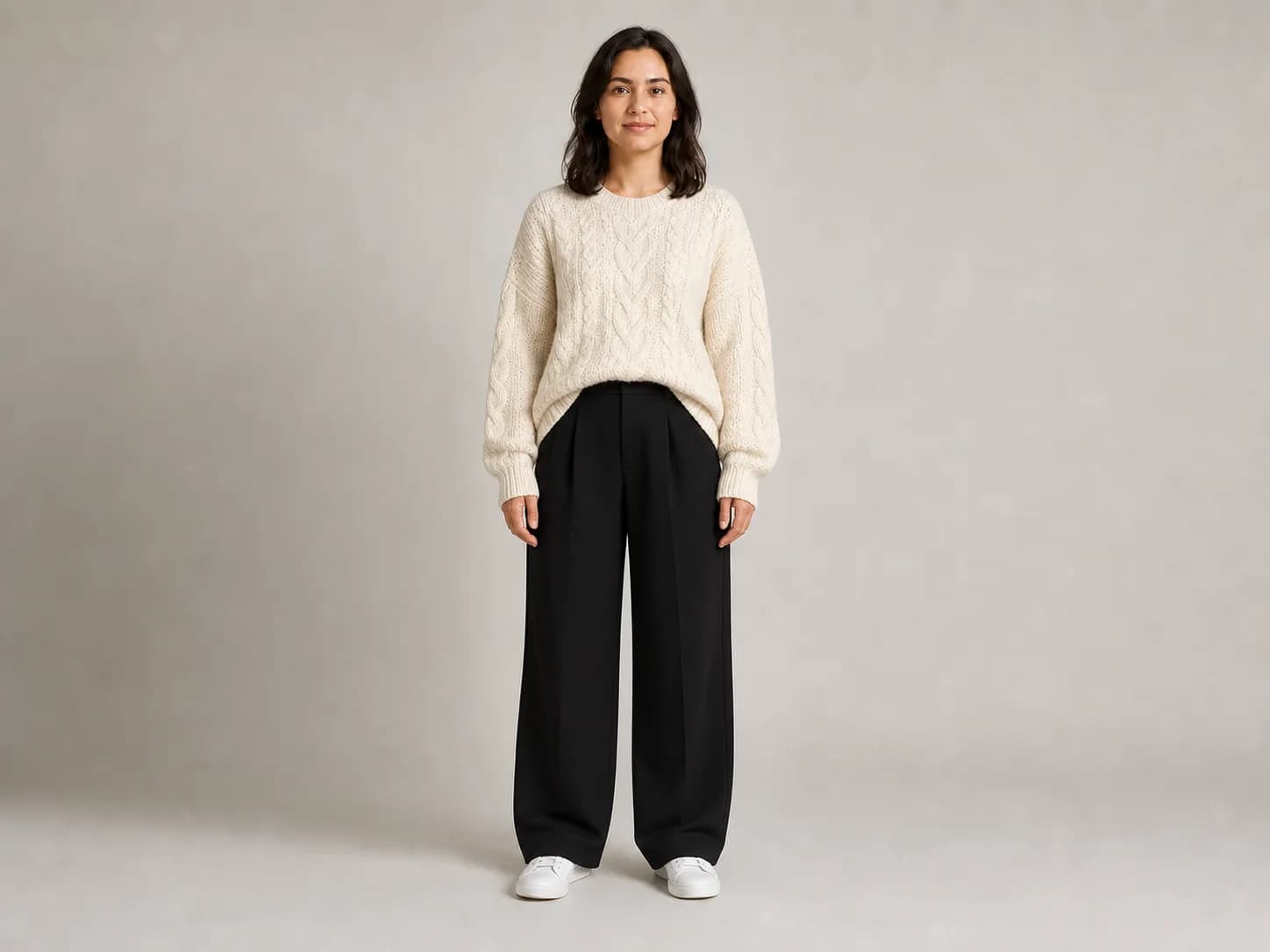
The same source is edited into a bulky sweater and wide trousers, with explicit dimensions and landmarks listed as locked details.

Changed: garment volume
Source: visible body landmarks for Can an oversized outfit avoid reshaping the body? in the AI Photo Editing Prompt Benchmark
Source: visible body landmarks
Result: oversized fabric, locked proportions for Can an oversized outfit avoid reshaping the body? in the AI Photo Editing Prompt Benchmark
Result: oversized fabric, locked proportions

Exact prompt

Edit the supplied source image. Replace only the clothing with a relaxed cold-weather outfit: oversized ivory cable-knit sweater with dropped shoulders, high-waisted wide-leg black trousers, and clean white sneakers. Change only the garments. Keep the exact same fictional woman's face, expression, hair, skin tone, age impression, shoulder width, torso length, waist position, hip width, leg length, standing pose, hand placement, camera angle, crop, studio background, floor, lighting, and contact shadow unchanged. The oversized sweater must drape around the unchanged body rather than making the body wider.

Observed result
The cable-knit sweater and wide trousers look intentionally oversized, while the head position, shoulders, hands, stance, visible leg length, and studio framing remain close to the source.
Limitation
Loose garments hide the underlying waist and hip edges, so visual inspection cannot confirm every body dimension even when the landmarks appear stable.
Next fix
Use silhouette, pose, or depth controls when available and compare fixed landmarks at the shoulders, elbows, waist height, hips, knees, and ankles rather than judging only the garment outline.
Held constant
identity, shoulder position, torso length, waist height, leg length, stance, frame

Test 3 · OpenAI image generation · independent layout generations · 2026-08-17

Four-cut strip or 2x2 grid: which layout is clearer?

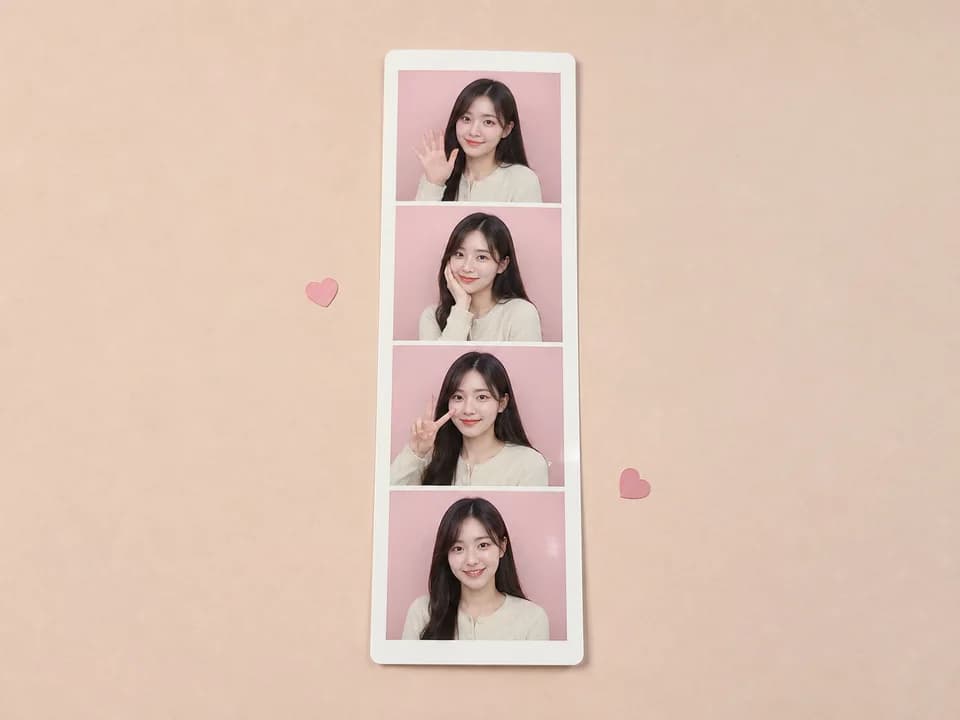
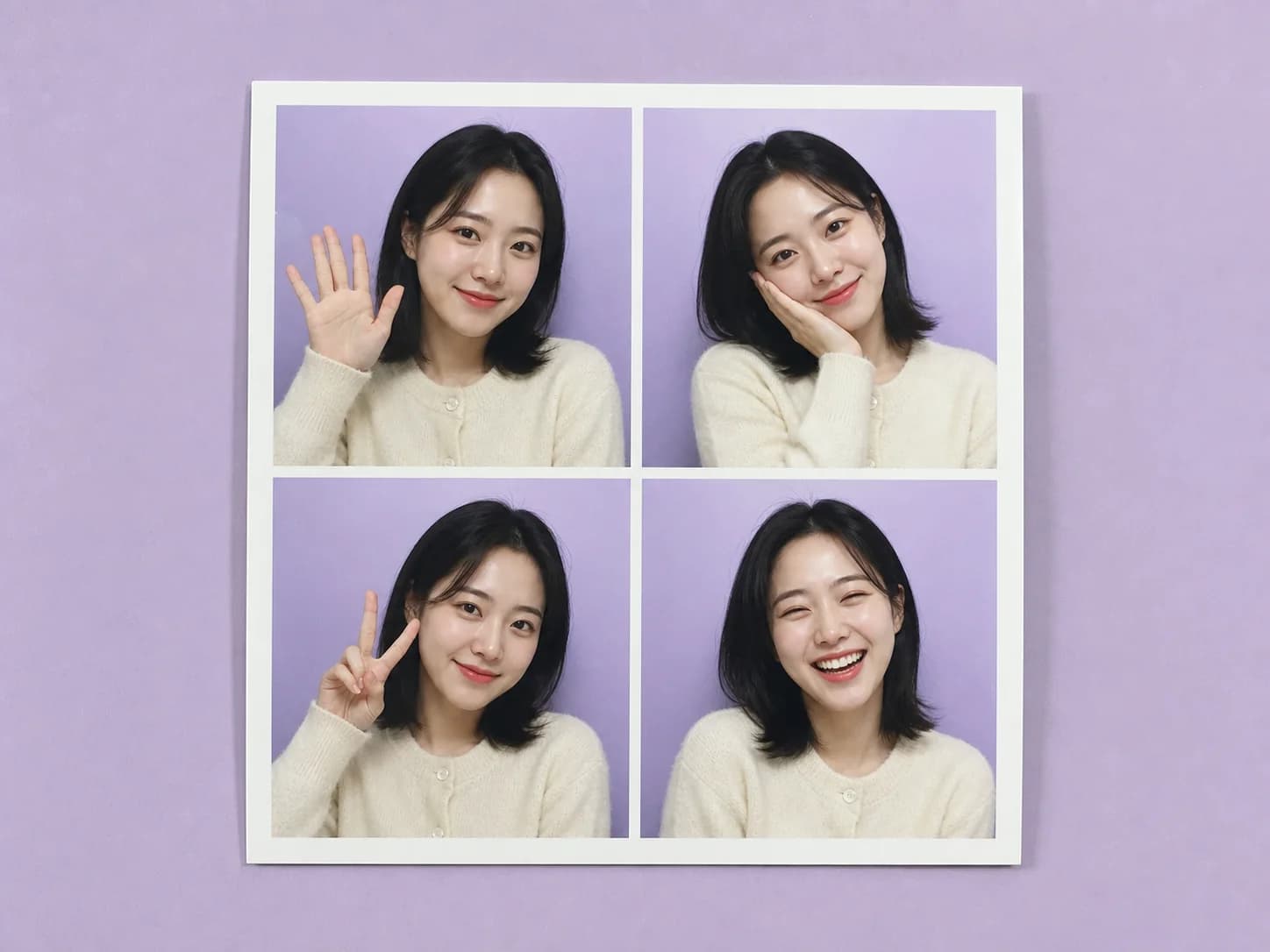
A previous four-cut strip is compared with a new 2x2 print to inspect panel size, pose readability, and intended output format.

Changed: panel layout
Reference output: vertical four-cut strip for Four-cut strip or 2x2 grid: which layout is clearer? in the AI Photo Editing Prompt Benchmark
Reference output: vertical four-cut strip
Comparison output: square 2x2 grid for Four-cut strip or 2x2 grid: which layout is clearer? in the AI Photo Editing Prompt Benchmark
Comparison output: square 2x2 grid

Exact prompt

Create one physical square 2x2 Korean-style photobooth print shown flat on a pale lavender tabletop. The print contains exactly four equal portrait panels arranged as two columns by two rows. Every panel shows the same fictional adult East Asian woman with consistent face, shoulder-length black hair, cream cardigan, and pastel lavender booth background. Poses in reading order: small wave, cheek pose, peace sign, natural laugh. Use soft front-facing booth flash, crisp white outer border and gutters, no readable text, and no extra photos.

Observed result
Both outputs make four poses readable. The strip better matches a physical Korean four-cut souvenir, while the 2x2 grid gives each face more width and works better as a square social image.
Limitation
These are independent generations with different fictional subjects, so the comparison evaluates composition only and cannot support an identity-consistency conclusion.
Next fix
Choose the layout before writing pose details: request a vertical strip for booth-print intent or an exact 2x2 grid for square-post intent, then test identity separately with the same owned reference.
Held constant
four frames, one fictional subject per output, cream outfit, pastel booth background, simple poses, white borders

Test 4 · OpenAI image generation · source-image edit · 2026-08-17

Does background-only wording preserve the portrait frame?

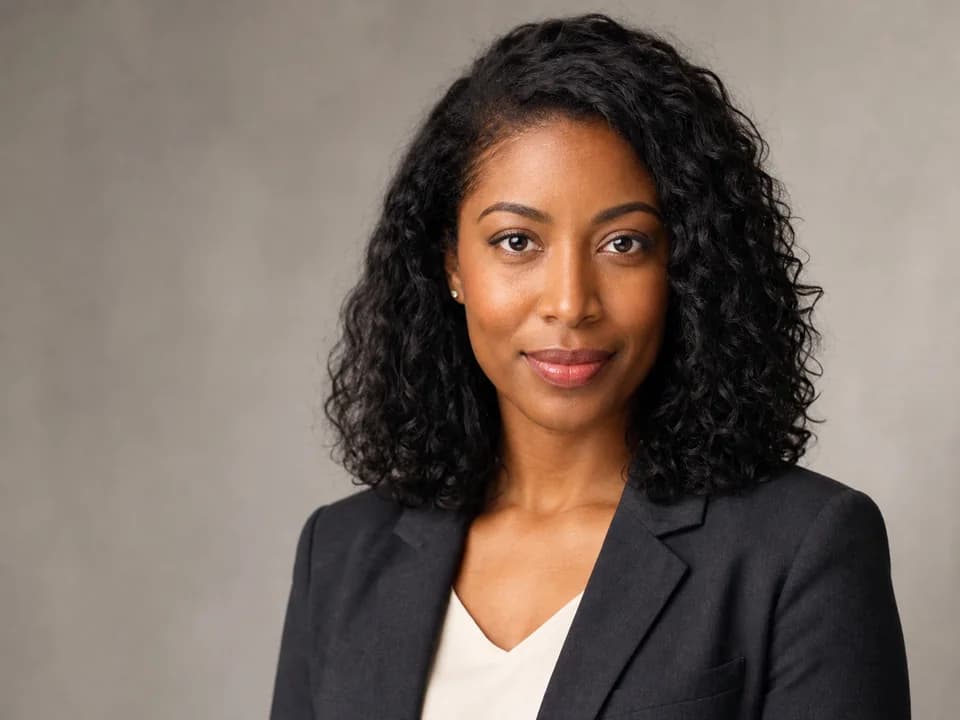
The source portrait requests a modern office background while face, hair, clothing, crop, camera, and light are all declared locked.

Changed: background setting
Source: warm-gray studio background for Does background-only wording preserve the portrait frame? in the AI Photo Editing Prompt Benchmark
Source: warm-gray studio background
Result: blurred office background for Does background-only wording preserve the portrait frame? in the AI Photo Editing Prompt Benchmark
Result: blurred office background

Exact prompt

Edit the supplied source portrait. Replace only the plain warm-gray studio background with a softly blurred, bright modern office background containing neutral white walls, one subtle window-light area, and indistinct office shapes. Change only the background. Keep the exact same fictional woman's face, facial structure, expression, eyes, skin tone, realistic skin texture, hair and every curl edge, earrings, charcoal blazer, cream top, shoulders, body position, crop, camera angle, focal-length look, subject sharpness, and facial lighting unchanged.

Observed result
The setting changed to a believable office and the person remains recognizably consistent in face, hair, expression, blazer, top, and light direction.
Limitation
The result tightened the crop and enlarged the head and shoulders, even though crop, camera angle, and framing were explicitly listed as unchanged.
Next fix
Use a canvas-preserving background replacement or generate the office separately and composite behind the original subject when exact frame geometry matters.
Held constant
face, expression, hair, clothing, subject lighting, intended crop, camera look

Best Prompt Formula

Use this formula when you want a more stable result than a one-line prompt. It is written so the prompt can be copied, cited, and refined one part at a time.

  1. 1Source: retain the untouched file and record whether the task is generation, local editing, or a layout comparison.
  2. 2One changed variable: name the single garment, background, layout, or other property allowed to change.
  3. 3Locked details: list identity, anatomy, pose, hands, camera, crop, background, lighting, or layout properties that must stay fixed.
  4. 4Inspection order: compare locked details before judging style quality or the attractiveness of the requested change.
  5. 5Evidence record: save the exact prompt, method, date, observed result, limitation, and one next adjustment.

Common Failure Fixes

If this happens
Fix it this way
Calling two independently generated subjects a same-identity before-and-after test.
Use an editor that accepts a source image; use masking or inpainting when the changed region can be isolated.
Claiming a cross-model winner when only one generation method was used.
Retain the untouched source file and start every rerun from it rather than from a drifted result.
Judging an edit only by style quality while ignoring crop, pose, body, or background drift.
Request one change per run and list locked details separately from style details.
Rerunning from an already changed result instead of the original source.
Compare source and result at the same dimensions before judging preservation.

Prompt Quality Checklist

Use this checklist before you rerun a prompt. It keeps the output focused and makes it easier to improve one variable at a time.

One clear subject
Specific setting or background
Lighting and camera direction
Output format or aspect ratio
What should stay consistent
What to avoid or edit later

Best Use Cases

Evaluating whether an edit prompt changed only the requested area.
Comparing source and result before publishing an identity-sensitive portrait.
Choosing between vertical four-cut and square 2x2 photobooth layouts.
Documenting a repeatable prompt test for a team or content workflow.
Writing evidence-led AI photo editing guidance for search and AI answers.

How to Use

  1. 1Choose one benchmark case that matches your task: clothing, body proportions, photobooth layout, or portrait background.
  2. 2Open the source and result together, then read the exact prompt and the list of details held constant.
  3. 3Copy the prompt into an image editor that accepts your own reference photo and replace only the bracketed variable.
  4. 4Inspect locked details before judging style quality; a polished result is still a failed edit if identity, body, pose, or crop moved.
  5. 5Use the recorded limitation and next fix to make one controlled rerun from the original source image.

Best Settings

  • Use an editor that accepts a source image; use masking or inpainting when the changed region can be isolated.
  • Retain the untouched source file and start every rerun from it rather than from a drifted result.
  • Request one change per run and list locked details separately from style details.
  • Compare source and result at the same dimensions before judging preservation.
  • Add typography, date stamps, and small labels after generation when exact text matters.

Common Mistakes

  • Calling two independently generated subjects a same-identity before-and-after test.
  • Claiming a cross-model winner when only one generation method was used.
  • Judging an edit only by style quality while ignoring crop, pose, body, or background drift.
  • Rerunning from an already changed result instead of the original source.
  • Changing clothing, background, pose, age, and lighting in one request and then blaming one unclear failure.

Official references

Check current model capabilities before you generate

Editing tools, aspect ratios, safety rules, and usage rights can change. These official help pages explain the current product workflow; AI Trend Prompt Hub is independent and provides adaptable prompt text, not platform policy.

Related Prompts

Why AI Changes My Face

Learn why AI photo edits change your face and copy identity-preservation prompts that reduce face drift during outfit, background, and portrait edits.

Open prompt library

Preserve Body Proportions in AI Outfit Changes

Copy AI outfit-change prompts that preserve shoulder width, torso length, waist position, hip width, limb length, stance, and camera perspective.

Open prompt library

Reference Image vs Text Prompt

Learn when to use a reference image, a text-only prompt, or both for identity, outfit, pose, background, and AI photo editing tasks.

Open prompt library

Korean Four-Cut vs 2x2 Photobooth

Compare Korean four-cut photo strips with 2x2 photobooth grids and copy prompts for vertical booth prints, square posts, couples, and friends.

Open prompt library

Same Face Outfit Change Prompt

Copy the exact same-face outfit change prompt to replace only clothing while preserving identity, expression, skin tone, hair, body, pose, lighting, and background.

Open prompt library

AI Clothes Changer Prompt

Copy 20 AI clothes changer prompts for broad outfit swaps, virtual try-ons, shirts, jackets, workwear, streetwear, and realistic garment replacement.

Open prompt library

ChatGPT Prompts for Pictures of Yourself

Copy 20 ChatGPT prompts for pictures of yourself, including profile photos, outfit edits, travel-style portraits, brand boards, and safe selfie variations.

Open prompt library

Korean Photobooth Prompt

Copy Korean photobooth prompts for AI four-cut photo strips, couple poses, friend selfies, pastel stickers, white borders, and booth prints.

Open prompt library

FAQ

What is an AI photo editing prompt benchmark?+

It is a documented comparison that keeps the source image, exact prompt, requested change, preservation rules, result, limitation, and next fix together so the edit can be inspected rather than described vaguely.

Which AI image model won this benchmark?+

This page does not name a winner because equivalent results from multiple models were not tested. The current cases document one declared OpenAI image-generation workflow.

Do strict preservation prompts guarantee the same face?+

No. They make the edit boundary clearer, but a model may still alter facial detail, crop, pose, body proportions, or lighting. Always compare the retained source and result.

What is the best way to test an outfit change prompt?+

Keep one source image, request one garment change, lock face, body, pose, hands, camera, background, and light, then inspect those locked details before judging the new outfit.

Is a four-cut strip the same as a 2x2 photobooth grid?+

No. A four-cut strip stacks four frames vertically like a booth souvenir. A 2x2 layout places four larger panels in a square that is usually easier to use as a social post.

Why did the background edit change the crop?+

Image editors may redraw more than the named area. The test shows that written crop constraints can still fail, so exact framing may require a canvas-preserving or compositing workflow.

Can I use these benchmark images commercially?+

Review the site's image usage page and the terms of your own image platform. The examples document prompt behavior and do not automatically clear every third-party right or commercial use.

Explore proven prompt libraries

Keep building with prompts that already match real search needs

Browse the strongest outfit, self-photo, photobooth, ChatGPT, and Gemini prompt pages without leaving this site.